


Turn-In Tracker Slips: K–12 Classroom Management
 Tiffiny
✏️ The turn-in tracker slip system is the classroom management tool Tiffiny wished existed on her very first day of student teaching — and after 25 years of refining it across every grade level from Kindergarten through 12th grade, it is the real system she actually used.
- It starts with a simple problem every teacher knows: papers pile up, the inbox overflows, and somewhere in that stack someone is missing a permission slip or a second draft and you have no fast way to know who. A plain name list tells you nothing once you have more than one assignment in play. A gradebook shows you columns, but not at a glance, not right next to the turn-in basket where you need the information most.
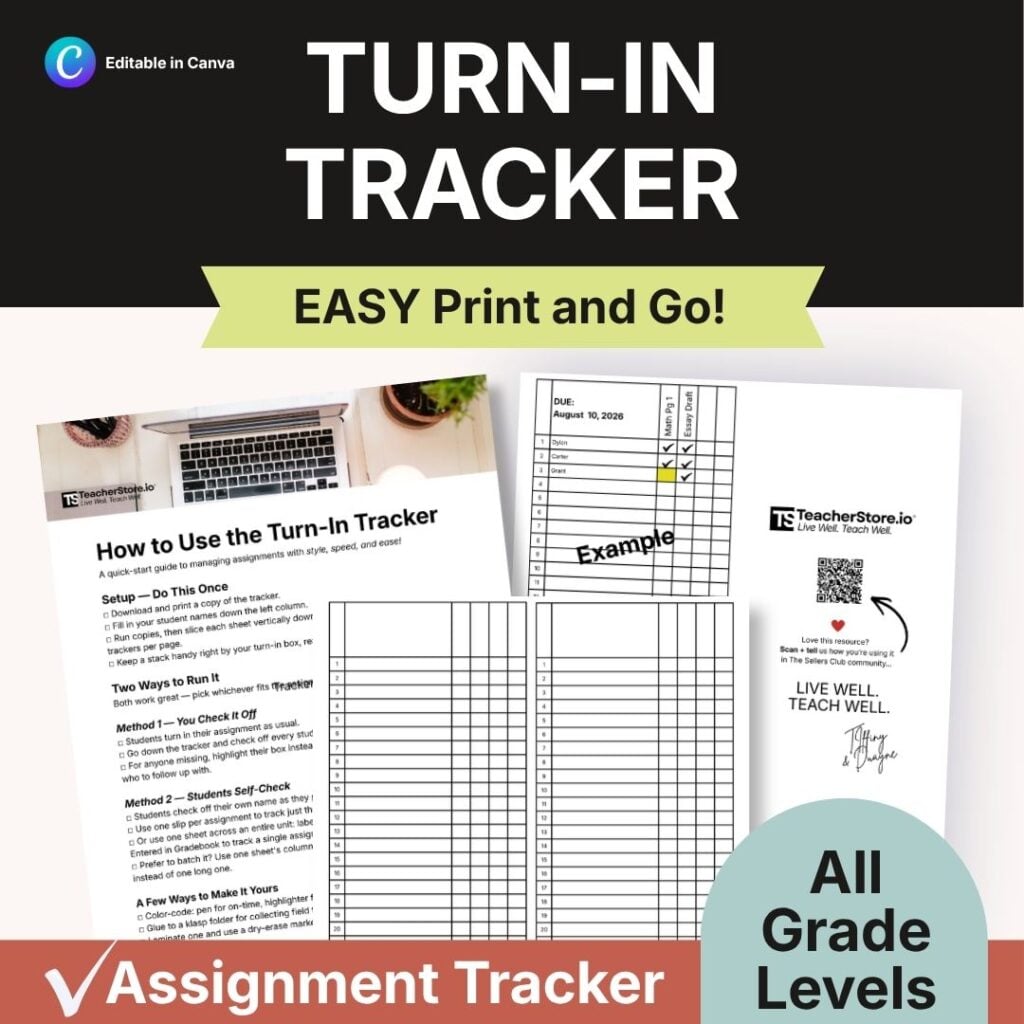
- This tracker solves that. Each slip prints with your class list down the side and blank columns across the top — label them whatever you need: homework, permission slip, draft one, draft two, classroom job log, presentation sign-up. Print a slip, slice it, and stack it right next to the basket. When a student turns something in, they find their name and check it off. Second graders can run this independently. So can seniors.
- The highlighting convention is the magic detail that makes the turn-in tracker slip system work over time. When work comes in late, highlight the cell and add a checkmark. One glance tells you the item arrived and that it arrived late — no separate late log, no sticky notes, no memory required. Stack several slips together and patterns of repeated missing work become visible immediately.
📚 This system works for homework, permission slips, multi-stage writing projects, classroom jobs, presentations, and any other multi-step assignment type you manage. It is grade-agnostic, subject-agnostic, and infinitely adaptable.
🌈 Tiffiny taught for over 25 years and served four years as an administrator. This is not a theoretical resource. It is the tool she trusted every single day.
This is the perfect go-to system for any teacher who has ever looked at a giant pile of papers in the turn-in basket and wondered, "How am I going to track all of these papers?" The turn-in tracker helps you easily sort all of your papers into piles and then check off the lists of names of the students who have turned in their work. Just circle or highlight anyone that hasn't turned in their work yet or whose work is missing, so that if they turn it in late, you know you've got it. I designed this to be a very simple print-and-go system so that you can keep a stack of these handy around your classroom. Once you teach your students how to use this, it makes it even easier.
What grade levels does this tracker work for?
It works for any grade, K through 12. I used the same core design across every grade level over 25 years. The blank columns adapt to the complexity of whatever you are teaching — simple homework columns for younger grades, multi-stage project tracking for older ones.
What subjects or assignment types can I track with this?
Any assignment you collect: homework, permission slips, multi-stage writing projects, classroom jobs, presentations, reading logs, and more. Because the columns are blank, you label them for exactly what you are collecting that week.
How does the late-work tracking work?
Highlight the cell when work is missing. Add a checkmark when it arrives. A plain checkmark means on time. A highlighted checkmark means the item came in late. No separate log, no extra column, no sticky notes — one glance tells the whole story.
Can students really manage this themselves?
Yes — students as young as second grade can sort turned-in papers into the correct piles and check off their own names. By middle and high school, students who know the system often hold each other accountable without any prompting from the teacher.
Does this require any special supplies or setup?
Just a printer, paper, and scissors or a paper cutter. Print the slips, slice the stack into individual trackers, and set them next to your basket. A highlighter is the only classroom supply the system calls for — and most teachers already have one nearby.
Questions about this resource
Wondering if this is the right fit before you buy? See what other shoppers asked, or ask Tiffiny your own. You don’t need to have bought anything.
Sign in to ask a question
Sign in so Tiffiny’s answer can reach you. You don’t need to have bought anything from Tiffiny.
No reviews yet — be the first to leave one.
Hi, I’m Tiffiny a former Disney princess turned educator, administrator, podcast host, and Co-Founder of TeacherStore.io™, which I proudly run with my husband and business partner, Duayne.
After 25+ years in K–12 education, I’m passionate about supporting teachers, homeschool families, and edupreneurs through creativity, connection, and community.
We live in the beautiful Temecula Wine Country of Southern California, where we’re raising our three boys, building our dream business, and embracing this wild and wonderful life together.
When I’m not creating content or coaching educators, you’ll find me enjoying time with family, soaking up live country music, decompressing in a hot yoga class, or unwinding with spa days, enjoying good food, and sipping on a glass of great wine.
Welcome to TeacherStore.io! We're glad you're here.